⚠️ Important BC Frequency Change — October 1, 2026
British Columbia MeshCore Amateur radio operators are changing to 909.000 MHz on October 1, 2026. BC amateurs should update their companion radios, repeaters, and room servers so they remain connected after the changeover.
The VA7REF solar-powered repeater has already changed to 909.000 MHz. Operators wishing to reach VA7REF should configure their radios for the new frequency now.
Before changing a node, check the Ridgeline FAQ maintained by VE7KOD for the latest BC network instructions and any additional configuration details.
What Is Salish Mesh?
Salish Mesh is a non-Radio operator volunteer-run, off-grid mesh radio network covering the Salish Sea region — including Metro Vancouver, Greater Victoria, and parts of the BC coast. It is built on MeshCore, an open-source firmware designed for low-power LoRa radios.
The network uses LoRa equipment in the 900 MHz band. In British Columbia, the locally coordinated MeshCore frequency of 910.525 MHz. Which is NOT changing over on October 1, 2026. Many participants are licensed amateurs, although licence-exempt equipment must be operated within the applicable Canadian technical rules. Regional settings may differ outside BC.
Most repeater nodes are solar-powered, making the network resilient during power outages and emergencies. The focus is on text messaging and small data packets — not voice or streaming — which lets it run reliably on modest hardware and low power budgets.
Learn more at the official site: salishmesh.net
BC MeshCore Radio Amateur (HAM)Settings
For British Columbia operation beginning October 1, 2026, use the new locally coordinated frequency shown below. VA7REF is already operating on this frequency.
| Parameter | Value |
|---|---|
| Configuration | BC local setting |
| Frequency | 909.000 MHz |
| Bandwidth | 62.5 kHz |
| Spreading Factor | SF7 |
| Coding Rate | CR5 (4/5) |
The frequency shown here reflects the announced BC change. Confirm all settings against the Ridgeline FAQ before configuring a repeater or other permanent infrastructure, because network parameters may be revised.
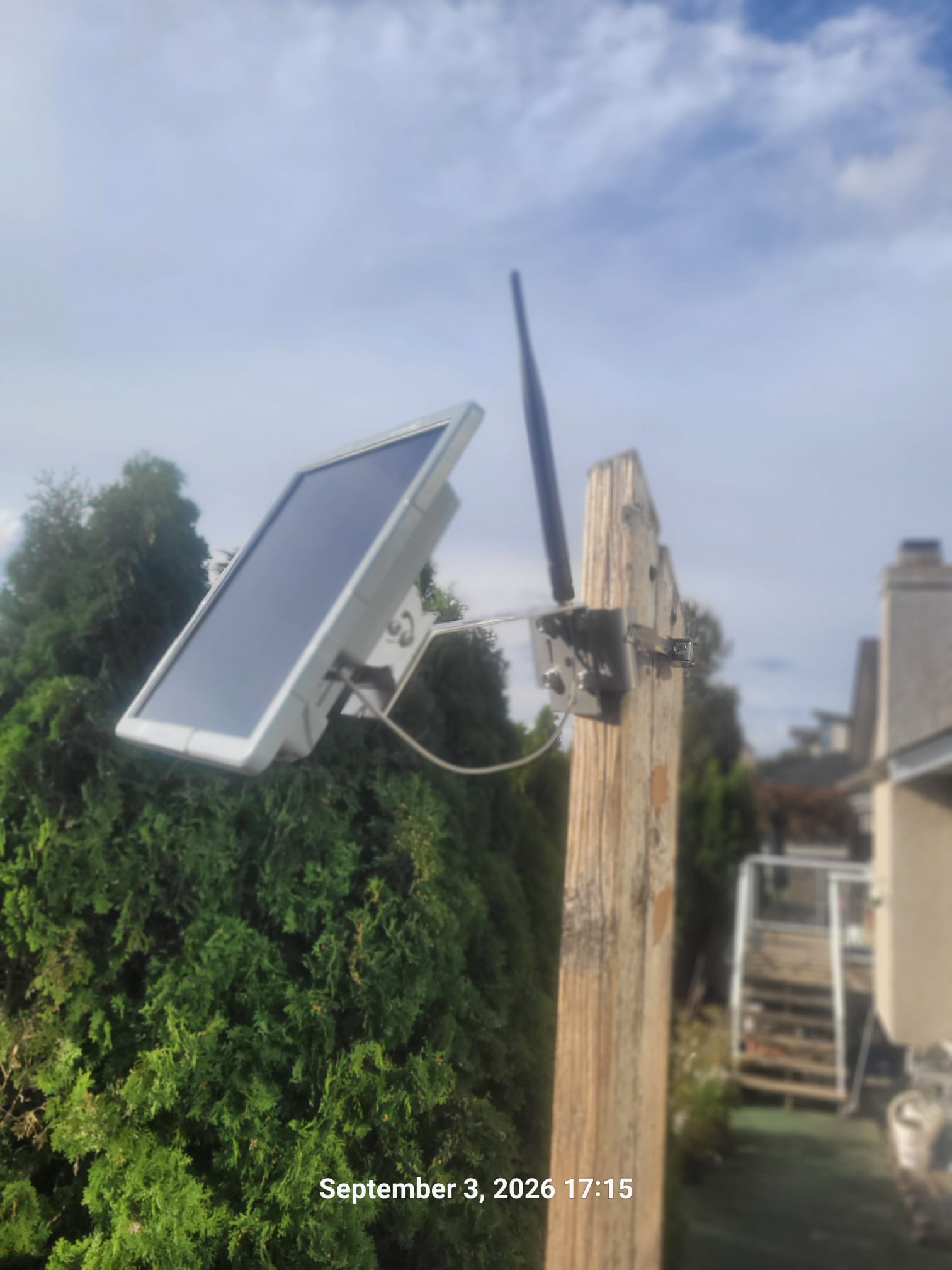
VA7REF Solar Repeater
VA7REF is a solar-powered MeshCore repeater serving the local community. It has already switched to 909.000 MHz ahead of the province-wide October 1, 2026 changeover. Its solar panel and independent power system help keep the repeater available without relying on household power.
Getting On the Mesh (Vancouver / Richmond)
Follow these steps to get your MeshCore node up and running:
- Flash MeshCore firmware to a compatible LoRa device (such as a LilyGo T-Beam, Heltec LoRa 32, or similar SX1276/SX1262-based board). Visit meshcore.ca for firmware downloads and instructions.
- Set the BC frequency to 909.000 MHz. The BC network changes on October 1, 2026, and VA7REF is already using the new frequency. Consult the Ridgeline FAQ for the latest instructions before saving your configuration.
- Set your callsign or device name. Use your amateur radio callsign if you are licensed (e.g., VE7LEE). Licensed operators should identify as required by their licence conditions.
-
Join the local channels listed below. Start with
#salishmeshand#vancouverto hear local traffic. - Check your RF path. From Vancouver and Richmond, many nodes have line-of-sight to solar repeaters on local peaks. Use the coverage map at salishmesh.net/coverage to find nearby infrastructure.
-
Say hello! Introduce yourself on
#vancouveror#salishmeshand ask for a signal report.
Local Channels
Channels in MeshCore work like named chat rooms. Below are the active channels used by the Vancouver and Salish Mesh community. Join the ones relevant to your area and activity.
General & Regional
Bots & Testing
#bot-van carries automated bot traffic and beacons. #testing is for experimenting with your node — please do not clutter operational channels with test traffic.
Emergency
#emergency is reserved for genuine emergency communications. Do not use this channel for routine traffic, testing, or casual conversation.
Region Scopes
Region scopes define how widely a message is repeated across the mesh. Choosing the right scope keeps traffic local and reduces unnecessary network load.
bc — covers British Columbia broadly.
swbc — South-West BC, including Metro Vancouver, the
Fraser Valley, and the Sunshine Coast.
salishmesh — the full Salish Mesh region, spanning
the Salish Sea including parts of Washington State via the Puget Mesh link.
Use the narrowest scope that covers your intended audience to be a good mesh citizen.
Maps & Tools
These external resources help you visualize coverage, track nodes, and analyse the network:
📺 Video Resources
Watch these videos to learn more about MeshCore, how to set up your hardware, and what the network can do. Videos open on YouTube in a new tab if your browser blocks embedded players.
Legal & Regulatory Disclaimer
This page is an independent, unofficial reference guide maintained by VE7LEE. It is not affiliated with, endorsed by, or sponsored by the Salish Mesh project, Puget Mesh, or any regulatory body. Information is provided in good faith for educational purposes and may not reflect the most current network configuration. The announced October 1, 2026 frequency change and the reported operating status of VA7REF should be confirmed with the Ridgeline FAQ and local network coordinators before equipment is reconfigured.
Radio regulations: Operation in the 900 MHz band is subject to the rules of Innovation, Science and Economic Development Canada (ISED) in Canada and the FCC in the United States. Amateur radio operators must comply with the terms of their licence, including identification requirements. It is your responsibility to ensure your equipment and operating practices comply with all applicable regulations.
Emergency communications: The #emergency channel and mesh network infrastructure are community resources and are not monitored by emergency services. Do not rely on this network as your sole means of requesting emergency assistance. Always call 9-1-1 for life-threatening emergencies.
No warranty: Coverage maps, node lists, and preset values may change without notice. No guarantee of network availability, reliability, or fitness for any particular purpose is made or implied.